


Summary
Learn how to use the DNS A record API to create, read, update, and delete records programmatically with Python and name.com's CORE v1 API, complete with working code for dynamic DNS, CI/CD pipelines, and multi-tenant onboarding.
Your SaaS app signs up 80 new customers a day, and each one gets a dedicated subdomain pointing to their provisioned server IP. At that volume, manual DNS updates turn your onboarding flow into a bottleneck. Three concrete situations demand programmatic DNS A record management: a multi-tenant onboarding flow where each customer signup triggers subdomain creation (e.g., acme.yourapp.com pointing to 203.0.113.10); a CI/CD pipeline that spins up a fresh EC2 instance, gets a new public IP, and needs staging.yourapp.com to resolve before integration tests run; and a home lab or edge deployment where the ISP reassigns the public IP on every lease renewal and a cron job needs to keep the domain current.
The name.com CORE v1 API covers all three with standard REST semantics. The rest of this guide is the working implementation.
Authentication setup: tokens, environments, and credentials hygiene
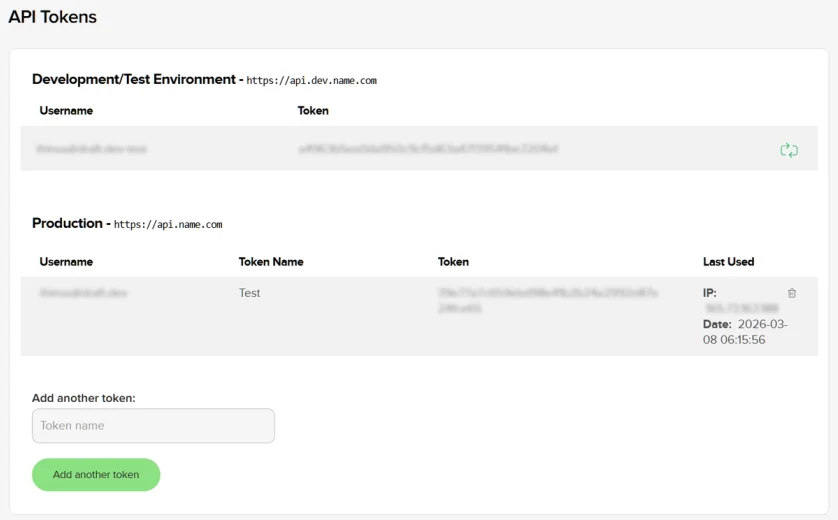
Generate your token through the name.com account UI: API -> API Token Management, then "Create API Token." One constraint before you start: the CORE v1 API uses HTTP Basic Auth, and accounts with 2FA enabled will get authentication failures. Enable API access on your account settings first to disable the 2FA requirement for API calls.
Two base URLs cover the full workflow:
- Production:
https://api.name.com/core/v1 - Sandbox:
https://api.dev.name.com/core/v1
For sandbox authentication, append -test to your username (e.g., jsmith-test) and use the sandbox token, which you generate separately from the same API Tokens screen. All examples in this article target the sandbox first. The only change needed to hit production is swapping BASE_URL.
No official Python SDK exists for CORE v1 (the community pynamecom package targets the deprecated v4 API and won't work here). You're making direct HTTP calls with requests:
import os
import requests
from dotenv import load_dotenv

load_dotenv()

BASE_URL = os.getenv("NAMECOM_BASE_URL")   # https://api.dev.name.com/core/v1 for sandbox
USERNAME = os.getenv("NAMECOM_USERNAME")   # youruser-test for sandbox
API_TOKEN = os.getenv("NAMECOM_API_TOKEN")

session = requests.Session()
session.auth = (USERNAME, API_TOKEN)
session.headers.update({"Content-Type": "application/json"})
Storing credentials in environment variables (or a .env file loaded via python-dotenv) keeps secrets out of the script entirely, making it safe to commit. BASE_URL as an env var lets you toggle between sandbox and production without touching code.
You can verify a credential pair works with a quick curl against the “hello” endpoint before writing any Python:
curl -u "youruser-test:your-sandbox-token" \
  "https://api.dev.name.com/core/v1/hello"
A 200 response with a JSON body confirms the token is valid.
{
  "motd": "Welcome to Core API from Name.com",
  "serverName": "3108",
  "serverTime": "2026-05-10T17:09:30Z",
  "username": "youruser-test"
}
Creating a DNS A record: POST /core/v1/domains/{domainName}/records
The create record endpoint accepts a JSON body with three required fields: host (the subdomain label relative to the zone), type (set to "A"), and answer (the IPv4 address). The ttl field is optional, but set it explicitly. The API rejects any TTL below 300 seconds, and omitting it leaves you at the registrar's default, which may be longer than your use case needs.
Note: You need to create a domain in the sandbox environment first for these code snippets to work. See the documentation pages for more information on how to do this.
def create_a_record(domain_name, host, ip_address, ttl=300):
    url = f"{BASE_URL}/domains/{domain_name}/records"
    payload = {
        "host": host,
        "type": "A",
        "answer": ip_address,
        "ttl": ttl,
    }
    response = session.post(url, json=payload)
    response.raise_for_status()
    return response.json()

# Example usage - Subdomain record: creates api.coolstartup.io pointing to 192.168.113.42
record = create_a_record("coolstartup.io", "api", "192.168.113.42")
print(record)

A successful call will yield output similar to this:

```json
{
  "answer": "192.168.113.42",
  "domainName": "coolstartup.io",
  "fqdn": "api.coolstartup.io.",
  "host": "api",
  "id": 11709931,
  "ttl": 300,
  "type": "A"
}
You can also create apex records with the same function:
# Apex record: creates coolstartup.io pointing to 192.168.113.43
apex = create_a_record("coolstartup.io", "", "192.168.113.43")
print(apex)
The output should look similar to this:
{
  "answer": "192.168.113.43",
  "domainName": "coolstartup.io",
  "fqdn": "coolstartup.io.",
  "host": "",
  "id": 11711066,
  "ttl": 300,
  "type": "A"
}
The host field is relative to the zone. Pass "www" to create www.coolstartup.io, pass "api.v2" to create api.v2.coolstartup.io, and pass an empty string to target the apex (the zone root). The API also accepts "@" for the apex, but an empty string is less ambiguous in code that constructs host programmatically.
The response object includes the server-assigned id field, an integer you will need for interacting with the newly created record. Keep that id. Every subsequent PUT and DELETE request requires it in the URL path to update or delete the same DNS record.
Listing DNS records: GET /core/v1/domains/{domainName}/records
The list records endpoint returns all DNS records for a domain, each with the full set of fields: id, domainName, host, fqdn, type, answer, and ttl. Every update and delete operation depends on the id. You can't predict it from the record's content alone, so listing is the required first step before any modification.
def list_records(domain_name):
    url = f"{BASE_URL}/domains/{domain_name}/records"
    response = session.get(url)
    response.raise_for_status()
    return response.json().get("records", [])

def get_a_records(domain_name):
    return [r for r in list_records(domain_name) if r["type"] == "A"]

def find_record_by_host(domain_name, host):
    if host == "@":
        host = ""
    for record in list_records(domain_name):
        if record["host"] == host and record["type"] == "A":
            return record
    return None

# Example usage
record = find_record_by_host("coolstartup.io", "@")

if record:
    # print just some of the data
    print(f"Found A record: {record['answer']} (TTL: {record['ttl']})")
else:
    print("No A record found for that host.")

record = find_record_by_host("coolstartup.io", "api")

if record:
    # print the full record
    print(record)
else:
    print("No A record found for that host.")
Your output should look something like this:
Found A record: 192.168.113.43 (TTL: 300)
{'answer': '192.168.113.42', 'domainName': 'coolstartup.io', 'fqdn': 'api.coolstartup.io.', 'host': 'api', 'id': 11709931, 'ttl': 300, 'type': 'A'}
find_record_by_host returns the full record dict, including the id, which is exactly what the update and delete functions below require. The get_a_records helper is useful for audit scripts that enumerate all A records across a domain to check current state before a bulk operation.
Updating a DNS A record: PUT /core/v1/domains/{domainName}/records/{id}
The update endpoint is a full replacement. The body must contain at minimum type and answer. You only need to include ttl if you're changing it from the existing value. The record id in the URL path must match the resource you're replacing, and passing an ID that doesn’t exist returns a 404.
def update_a_record(domain_name, record_id, new_ip, ttl=None):
    url = f"{BASE_URL}/domains/{domain_name}/records/{record_id}"
    payload = {
        "type": "A",
        "answer": new_ip,
    }
    if ttl is not None:
        payload["ttl"] = ttl
    response = session.put(url, json=payload)
    response.raise_for_status()
    return response.json()

# Fetch the record first to get its id, then update
record = find_record_by_host("coolstartup.io", "api")
if record:
    updated = update_a_record("coolstartup.io", record["id"], "192.168.113.50")
    print(f"Record {updated['fqdn']} now points to {updated['answer']}")
This is what your output should look like:
Record api.coolstartup.io. now points to 192.168.113.50The two-step pattern (list to get id, then PUT) is the intended workflow. Our API conforms to the OpenAPI 3.1 specification, so if you're using Claude or Cursor to generate integration code, the spec file (available for download from the docs) gives those tools accurate type information without guessing.
Deleting a DNS A record: DELETE /core/v1/domains/{domainName}/records/{id}
The delete endpoint takes the record id in the path and returns HTTP 204 with an empty body on success. A 404 means the record doesn't exist at that ID.
def delete_a_record(domain_name, record_id):
    url = f"{BASE_URL}/domains/{domain_name}/records/{record_id}"
    response = session.delete(url)
    if response.status_code == 404:
        print(f"Record {record_id} not found (already deleted or wrong ID)")
        return False
    response.raise_for_status()
    return True

# deleting an A record
delete_a_record("coolstartup.io", 11709931)
The 404 check makes the function idempotent. Scripts that may run multiple times (cleanup jobs, teardown steps in CI) can call delete_a_record safely without treating a 404 as a fatal error.
When an IP is changing but the hostname stays live, update in place with PUT rather than deleting and recreating. Deleting a record and creating a new one starts a fresh TTL propagation cycle, because DNS resolvers that cached the old answer will continue serving it until their local TTL expires, then re-query and get the new address. Updating the existing record's answer field modifies the record in place, so resolvers pick up the change on their next natural refresh cycle.
Putting it together: a dynamic DNS updater you can run today
The script below composes all four operations into a working dynamic DNS updater. It fetches the machine's current public IP from api.ipify.org, checks the current answer for the target A record, and issues a PUT only if the IP has changed. All five configuration values come from environment variables, so the script itself contains no secrets and is safe to version-control.
Here is the script again, with all the code in one place:
import os
import requests
from dotenv import load_dotenv

load_dotenv()

BASE_URL = os.getenv("NAMECOM_BASE_URL")   # https://api.dev.name.com/core/v1 for sandbox
USERNAME = os.getenv("NAMECOM_USERNAME")   # youruser-test for sandbox
API_TOKEN = os.getenv("NAMECOM_API_TOKEN")

session = requests.Session()
session.auth = (USERNAME, API_TOKEN)
session.headers.update({"Content-Type": "application/json"})

def create_a_record(domain_name, host, ip_address, ttl=300):
    url = f"{BASE_URL}/domains/{domain_name}/records"
    payload = {
        "host": host,
        "type": "A",
        "answer": ip_address,
        "ttl": ttl,
    }
    response = session.post(url, json=payload)
    response.raise_for_status()
    return response.json()

def list_records(domain_name):
    url = f"{BASE_URL}/domains/{domain_name}/records"
    response = session.get(url)
    response.raise_for_status()
    return response.json().get("records", [])

def get_a_records(domain_name):
    return [r for r in list_records(domain_name) if r["type"] == "A"]

def find_record_by_host(domain_name, host):
    if host == "@":
        host = ""
    for record in list_records(domain_name):
        if record["host"] == host and record["type"] == "A":
            return record
    return None

def update_a_record(domain_name, record_id, new_ip, ttl=None):
    url = f"{BASE_URL}/domains/{domain_name}/records/{record_id}"
    payload = {
        "type": "A",
        "answer": new_ip,
    }
    if ttl is not None:
        payload["ttl"] = ttl
    response = session.put(url, json=payload)
    response.raise_for_status()
    return response.json()

def delete_a_record(domain_name, record_id):
    url = f"{BASE_URL}/domains/{domain_name}/records/{record_id}"
    response = session.delete(url)
    if response.status_code == 404:
        print(f"Record {record_id} not found (already deleted or wrong ID)")
        return False
    response.raise_for_status()
    return True
To run it against the name.com sandbox right now, edit your .env file, populate the variables with the right values, and use any of the examples shown earlier:
NAMECOM_USERNAME="youruser@yourorg-test"
NAMECOM_API_TOKEN="1234abcde6789efgh000000"
NAMECOM_BASE_URL="https://api.dev.name.com/core/v1"
The sandbox at https://api.dev.name.com mirrors production behavior exactly. You'll see a live PUT request go through the API and the response confirming the updated record ID and IP address. Switching to production requires only changing NAMECOM_BASE_URL and the credentials, with no code changes and no re-testing of the logic.
From here, the same session and helper functions extend to the rest of the name.com CORE v1 API: domain search, registration, and transfer management all follow the same authentication and error-handling patterns. The API quickstart is the logical next step if you're building beyond DNS registration as part of your service and/or application.
Generate your sandbox token and run the updater against a test domain today. Read the full API docs at docs.name.com
Frequently asked questions
What is the DNS A record API endpoint for name.com?
DNS A records are managed through /core/v1/domains/{domainName}/records on the CORE v1 API. POST creates a new record, GET lists existing records, PUT updates a record by its ID, and DELETE removes it by ID.
Why do I need to list records before updating or deleting a DNS A record?
Every update and delete call requires the record's server-assigned id, and that ID isn't predictable from the record's content. Calling the list endpoint first is the only way to retrieve it, so listing is a required step before any PUT or DELETE request.
Why does the name.com API return authentication failures with 2FA enabled?
The CORE v1 API uses HTTP Basic Auth, and accounts with two-factor authentication turned on will fail token authentication. Enabling API access in account settings disables the 2FA requirement specifically for API calls.
Should I update an existing A record or delete and recreate it when the IP changes?
Update the existing record in place with PUT rather than deleting and recreating it. Deleting and recreating starts a fresh TTL propagation cycle, while updating the answer field lets resolvers pick up the change on their next natural refresh.
What is the minimum TTL for a DNS A record on name.com?
The API rejects any TTL below 300 seconds. Leaving TTL out of the request entirely defaults to the registrar's setting, which may be longer than needed, so setting it explicitly is recommended.

